Morgan & Morgan
2021 - 2022

Optimizing Client Onboarding for Case Managers


Product Design
Service Design
Workflow Optimization
I designed a streamlined case-opening workflow that enables Case Managers to onboard clients faster by simplifying navigation, reducing manual data entry, and automating record creation.
Product
Designing a new case opening workflow
Litify is an enterprise legal operations and case-management platform built on Salesforce. At Morgan & Morgan, it centralizes client intake, case management, documents, workflows, and reporting into one system.
I redesigned the case-opening workflow to help Case Managers onboard clients faster by reducing clicks, manual data entry, field searching, and record creation time.
The Impact
The redesigned workflow eliminated unnecessary navigation, repetitive data entry, and manual field searching—reducing case onboarding time by 79% across all 50 states and impacting 4,000+ employees, while improving data accuracy and reducing administrative work and client calls.
Affected employees
Nationwide
Faster onboarding a new client
3.5 Hours → 45 min
New streamlined workflow
Countless Steps-> Set 6
Problem
Client Onboarding lacked a standardized workflow
When Litify was introduced, Case Managers lacked a clear process for turning new client intakes into complete cases. Scattered information, manual data entry, client follow-ups, and multiple record creations made onboarding slow, inconsistent, and error-prone.
Challenges
Challenge #1
Too Many Questions
The questionnaire was too long and time-consuming, which made clients less motivated to complete it.
"There are so many questions that clients can feel demotivated as soon as they open the questionnaire. Some rush through it and answer as best they can, some only complete part of it, and others don’t fill it out at all.”

Case Manager
Orlando, Florida

Challenge #2
No Central Hub; Manual Data Entry
The case opening form required too much manual data entry, making the process slow, inefficient, and prone to errors.
“I’m constantly going back and forth between different desktops and different parts of the platform to find the information I need. Nothing is in one place, so entering data feels unnecessarily slow and repetitive.”

Case Manager
Lousiville, Kentucky

Challenge #3
Reptitive Record Creation
Case Managers had to manually create multiple Role records, making the process time-consuming and inefficient.
“For every new case, I have to create multiple Role records one by one. It doesn’t take much thought, but it adds up quickly when I’m handling several cases.”

Case Manager
Brooklyn, NY

Design Pillars
Simplify
Reduce unnecessary questions, fields, and steps so users can complete tasks faster.
Centralize
Centralize scattered information into one accessible place.
Automate
Eliminate repetitive manual data entry and record creation wherever possible.
Prevent Errors
Use pre-filled information, validation, and clear guidance to reduce mistakes and missing data.
Key Design Decisions
Breaking down the Solution
Once I understood the end-to-end process, I systematically identified key pain points and used design strategy to tackle each one, collaborating closely with PMs and Engineers to develop feasible solutions.
Current state workflow

Tackling each challenge with Design Pillars
I broke down the complex problem into a step-by-step process. Each solution built on the previous one to deliver the final product.
Solution - Part 1
Simplify
Client Questionnaire
Problem
Clients often submitted incomplete or unanswered questionnaires.
Action
To interview 5 Senior Case Managers to identify essential onboarding data and gain VP Operations approval.
Expected Result
A condensed questionnaire to prioritize mandatory information.
Solution - Part 2
Design
Case Opening Form
Problem
No centralized hub for case and client information.
Action
To design a centralized form for all client and case data.
Expected Result
A centralized hub that contains prioritized fields to streamline onboarding.
Solution - Part 3
Prevent Errors w/ Data Field Mapping
Problem
Manual data entry caused errors and data inconsistencies.
Action
To map source and target fields with Engineers for accurate data transfer.
Expected Result
A case opening form that prepopulates fields to reduce manual entry and improve consistency.
Solution - Part 4
Automate
Record Creation
Problem
Manual creation of Role records slowed Case Manager workflows.
Action
To collaborate with Engineers to automate record creation through triggered fields.
Expected Result
Case managers can automatically create Role records without leaving the form.
Part 1 - Simplify Client Questionnaire
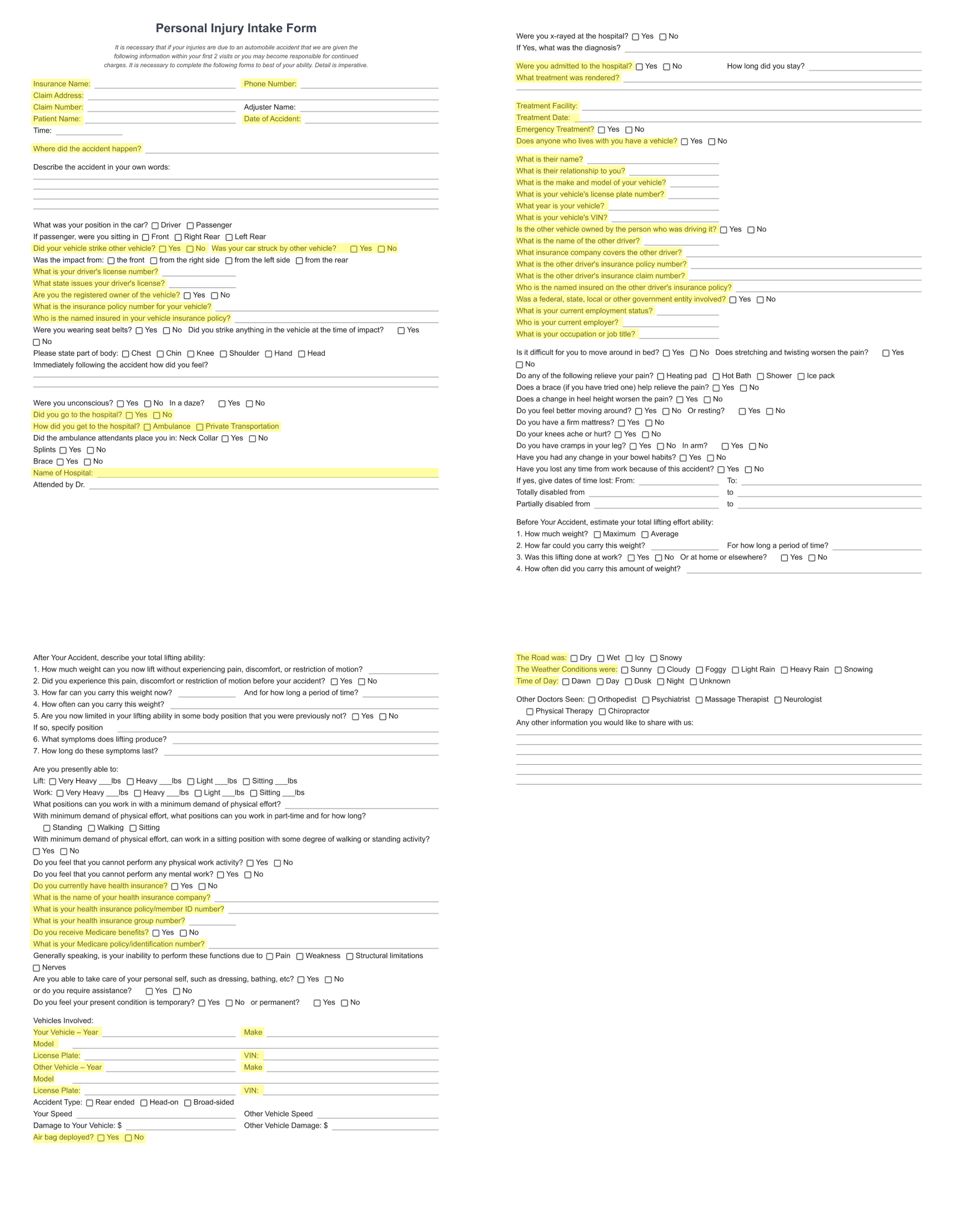
The questionnaire was lengthy and often incomplete, requiring Case Managers to chase missing information through additional calls.
I partnered with the VP of Operations and interviewed 5 Senior Case Managers to identify essential onboarding information, then streamlined the questionnaire to prioritize critical questions and required fields.
45 minute Interviews
to define high-priority questions
5 Senior Case Managers
from top performing states
VP of Operations
Primary Stakeholder Sign-Off
Time reduction in follow-up call time
from 30-45 minutes to 15–20 minutes while giving Case Managers more complete information upfront
Part 2 - Design Case Opening Form
With the questionnaire streamlined, information was still scattered across the platform, forcing Case Managers to navigate between screens, search for fields, and manually enter data to open a case.
Early Sketch

CTA to trigger the Case Opening Form
Mid Concept

Case Opening Form UX
“This will take additional time and custom development outside of Salesforce’s design system. Could we explore a new-tab approach instead of a popup? It would keep the same solution while reducing development effort. Can we validate this direction with the PM, Stakeholders, and Case Managers?”
Lead Engineer
Salesforce Platform Administrator
I initially explored a popup-based case-opening experience to bring all required fields into one place. After collaborating with Engineering, I learned that the custom solution would require significant development effort and risk project timelines.
Hi-Fidelity Design
I worked with Engineers to adapt the concept into a more feasible Case Opening Form launched from the Matter page in a dedicated tab, preserving the core UX goal while reducing technical complexity.

Hi-fidelity design of home screen & case opening form
After securing sign-off from the VP of Operations and PM, I partnered with Engineering to bring the solution to life.
Agreed Trade-off
Collaborated with Engineers to validate the custom solution instead of original concept
Easy visible CTA
Case opening form can be easily triggered
Fields Priority
Every field on the form is essential to opening a case
Part 3 - Prevent Errors from Manual Data Entry
Centralizing the information solved the navigation problem, but Case Managers still had to manually search for and re-enter the same information from the client questionnaire.
“This form is helpful, but I still have to go back and forth to find the client’s information and manually type everything in. It takes a lot of time for every new client I onboard.”
Case Manager
Brooklyn, NY
I partnered with PMs and Engineering to explore the concept of prepopulating fields automatically. To define how the data should flow, I leveraged my consulting experience to create a data field mapping sheet, documenting the source fields, transformations, and corresponding target fields.

Case opening form - data field mapping
“Not every field needs to be there for every case. Some questions only matter depending on how you answer the previous one."

VP of Operations
Orlando, Florida
The VP of Operations helped me spot that some fields only mattered based on previous answers, revealing key field dependencies. We worked through these relationships together, then brought Engineering in to turn them into conditional logic on the Case Opening Form, documenting everything in the data field mapping sheet.
01
Set Fields Visibility Settings
Determine which fields become visible when certain fields are populated
02
Set Required Fields
Certain fields will be mandatory for the Case Manager to retrive information if blank
03
Set Source & Target Fields
Link each field on the Case Opening Form to its source on the platform
Dynamic case opening form with set field visibility settings
The mapping became the blueprint for the form’s dynamic behavior, giving PMs, Engineers, and stakeholders a shared source of truth while reducing manual entry, unnecessary fields, and friction for Case Managers.
Time reduction in case opening form completion time
from 30–45 minutes to 10–15 minutes
Part 4 - Automate Record Creation
The final step was Role creation, with Case Managers manually creating 1–15 records at 10–15 minutes each. I worked with the VP of Operations to identify those fields, then partnered with Engineering to automate record creation based on those fields.

Fields that would trigger the Roles Creation automation
Certain fields would trigger the Roles Creation automation
I designed an automated Role creation workflow within the Case Opening Form, allowing Case Managers to select a Role, associate an account, and automatically populate the required information. The system then created the record and confirmed completion.
Time reduction in creating a Role record
from 10–15 minutes to ~2 minutes
Outcome
Streamlined Client Onboarding Experience
Measuring before & after workflows
The new workflow made case opening simpler and less frustrating: the questionnaire focused on what mattered, information was brought into one place, fields filled themselves in, and Role creation became automated, removing the repetitive work that slowed Case Managers down.
Before
Current State - Client Onboarding Workflow
After

Future State - Client Onboarding Workflow
Client Onboarding Workflow
Final Prototype of Client Onboarding Flow - Case Opening Form + Role Creation Automation
Overall design impact
67%
Time reduction in case opening form completion time
85%
Time reduction in creating a Role record
53%
Time reduction in follow-up call time
Faster onboarding a new client
3.5 hours → 45 minutes
Lessons
Learning to Leading, Curious to Confident
This project brought together so much of what I’ve learned throughout my career, from consulting and working with stakeholders to product design, data, and systems thinking. Being the only designer on the team pushed me to step up, think beyond the screen, and understand how everything from fields and data flow to engineering logic came together.
More than anything, the project reminded me to lead with curiosity, empathy, process, and teamwork. I’m grateful to have worked on something that challenged me from every angle and helped me grow, not just as a designer, but as a problem solver. I hope to carry that mindset into every project I take on next.
Key Takeaways
Agile is everything
I learned that a strong process needs flexibility. Staying open-minded, stepping back when needed, and letting go of my first idea helps me find better solutions and keep the work moving forward.
Expect the unexpected
I learned to anticipate roadblocks by trusting my intuition, asking the right questions, and overcommunicating, keeping Product and Engineering aligned before risks became problems.
Human-Centered Design
The user comes first. When I’m at a crossroads, I go back to the user’s needs and let them guide the decision.
Cross-collaboration is key
I learned that great design starts with alignment. Building a shared understanding and strategy with Product and Engineering before jumping into screens creates a stronger foundation and helps everyone move faster together.